
Hot-Swappable Keyboards: Are You Paying for Features or Just a Logo?
The Mechanical Keyboard Markup Mystery
If you’ve recently dived into the world of PC gaming or productivity, you’ve undoubtedly encountered the mechanical keyboard craze. The satisfying clicks, the responsive feel, the endless customization—it’s a deep rabbit hole. But it can also be a confusing one, especially when it comes to price. You might see a compact, RGB-lit keyboard for $150 from a big-name brand, and another with nearly identical features for a fraction of that price. What gives?
The price difference you see on the shelf often has less to do with the core components and more to do with the long journey a product takes to reach you. In the world of consumer electronics, hidden markups are common.
Why Are Some Keyboards So Expensive?
A keyboard that leaves a factory can pass through several hands before it lands on your desk, and each step can add to the cost:
- Brand Markups: Major brands invest heavily in marketing, sponsorships, and elaborate packaging. These costs are built directly into the final retail price. You’re not just paying for the keyboard; you’re often paying for the brand’s global advertising budget.
- The Distribution Chain: The path from manufacturer to you may involve exporters, importers, distributors, and finally, retailers. Each of these middlemen typically adds their own margin, inflating the price at every step.
- Perceived Value: Sometimes, a higher price is simply a marketing strategy to create a perception of higher quality, even when the underlying hardware is very similar to more affordable options.
How to Find Real Value in a Mechanical Keyboard
To avoid paying for hype, smart buyers learn to focus on the features that truly define the user experience. Instead of looking at the logo on the box, look at the spec sheet for these key indicators of quality and value:
- Switch Type: Do you want a clicky (Blue), linear (Red), or tactile (Brown) feel? The switch is the heart of the keyboard, so this is the most important choice.
- Build & Layout: Do you need a full-size board or would a compact 61-key layout save you precious desk space?
- Hot-Swappable Sockets: This is a game-changer. A hot-swappable keyboard allows you to change the mechanical switches easily without any soldering. This means you can try out different switch types, replace a faulty switch, or upgrade your entire set in the future. It’s a premium feature that dramatically extends the life and versatility of your keyboard.
Finding a keyboard with hot-swappable sockets often meant looking at expensive, enthusiast-grade models. But that’s changing, especially if you know where to look.
A Prime Example: The Allwin Hot-Swappable Keyboard
Many of the keyboards sold by famous brands are actually produced by OEM/ODM manufacturers who specialize in building high-quality hardware. By going closer to the source, you can get the same great features without the brand tax. A perfect example is the allwinOEM/ODM Mechanical Keyboard.
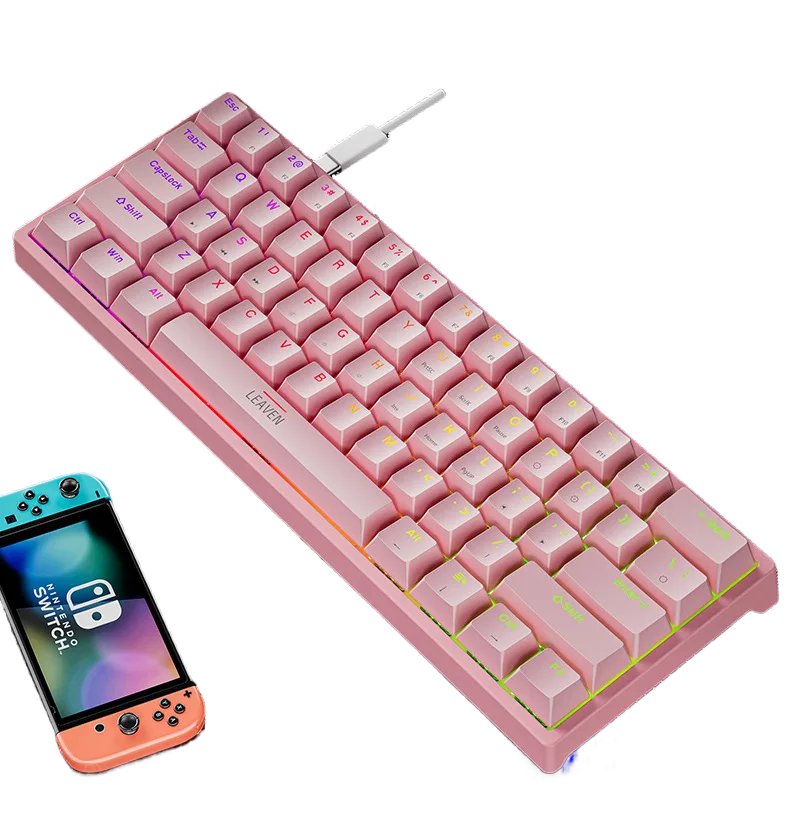
This keyboard packs a ton of value by focusing on what matters. It’s built around a compact 61-key layout, perfect for maximizing mouse space in a gaming setup. But its standout feature is the hot-swappable design. This gives you the freedom to customize and future-proof your investment—a feature often reserved for keyboards costing twice as much.
The K620 doesn’t skimp on the other essentials, either. It includes:
- Vibrant RGB backlighting to match your setup’s aesthetic.
- Your choice of popular Blue, Red, or Brown switches to get the exact feel you want.
- A reliable wired connection for lag-free gaming and work.
- A variety of color options and even dual-mode (Bluetooth + Wired) versions.
Ready to Upgrade Your Setup for Less?
Why pay a premium for a brand name when you can get the core features that enthusiasts demand directly? If you’re looking for a compact, customizable, and high-performance mechanical keyboard, the Hot-Swappable Gaming Keyboard proves that you don’t have to overspend to get a fantastic typing experience.
Stop paying for layers of marketing and distribution. Check out the specs, choose your favorite color and switch combination, and see what a factory-direct value looks like. Explore the allwinOEM/ODM Mechanical Keyboard today!


Add comment